Bank Statement to Tally Prime Converter
Convert bank statements to Tally Prime format. Extract transactions into clean CSV for seamless import — works with HDFC, ICICI, SBI, Axis, and all banks.
Use the same upload flow to convert files into clean, accounting-ready output with no merged cells.
Apply this workflow in seconds
Upload your file, review the extracted table, and export clean Excel or CSV output for accounting tools.
Drop Image / PDF
Or Ctrl+V paste
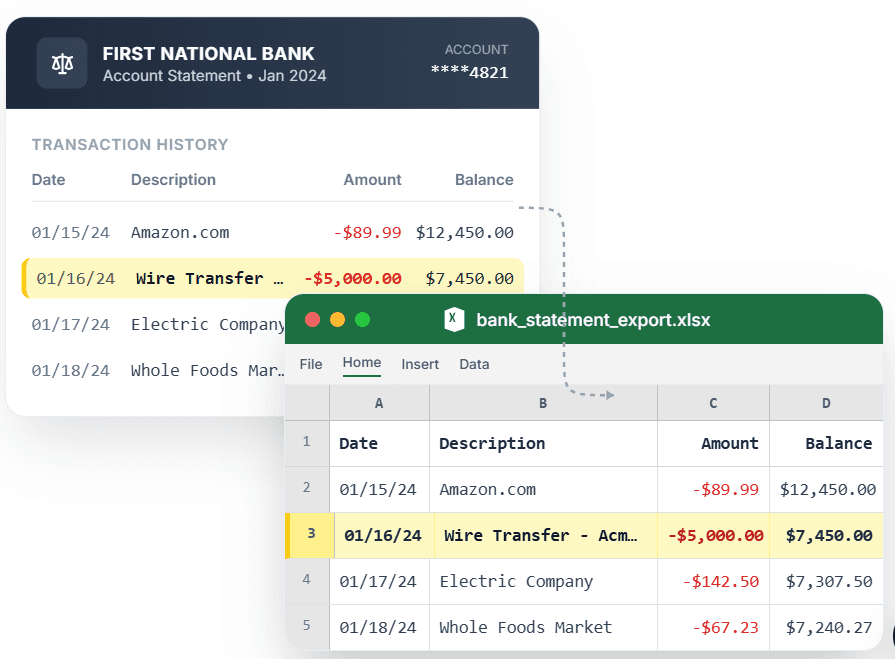
PDF → Clean Excel with separated columns, no merged cells.
Tally Prime requires transaction data in a specific structure for bank reconciliation. Manually keying statement entries is time-consuming and error-prone. CleanStmt converts your bank statement PDF into a Tally Prime-ready CSV with Date, Particulars, Debit, and Credit columns that map directly to Tally's import format. Upload your statement from HDFC, ICICI, SBI, Axis, or any bank, review extracted rows, and import into Tally Prime through Gateway of Tally → Display → Day Book → Import.
What you need
- A bank statement in PDF, scan, or screenshot form
- Tally Prime installed on your system
- No account or credit card required
How it works — three steps, under a minute
- 1Upload your bank statement PDF or screenshot from any bank.
- 2Review extracted transactions with Date, Particulars, Debit, and Credit columns.
- 3Import CSV into Tally Prime via Gateway → Display → Day Book → Alt+I.
Why use CleanStmt for this
Built so the export is ready the moment you download it.
Tally Prime-Ready Format
CSV exports with Date, Particulars, Debit, and Credit columns that Tally Prime accepts directly.
All Indian Banks Supported
Handles HDFC, ICICI, SBI, Axis, Kotak, Yes Bank, and international bank formats.
Fast Bank Reconciliation
Import months of transactions into Tally Prime in seconds instead of manual entry.
Who uses this workflow
Chartered Accountants
Import client bank statements into Tally Prime without manual keying.
Small Business Owners
Keep Tally Prime books updated with bank transactions quickly.
Bookkeepers
Reconcile multiple bank accounts in Tally Prime without data entry.
Accounting Firms
Process client statement PDFs into Tally-ready format at scale.
CleanStmt vs generic converters
Generic tools export a file. CleanStmt exports a file you can actually use.
| Feature | Other Services | CleanStmt |
|---|---|---|
| Tally import readiness | Manual entry or broken CSV | Tally Prime-ready CSV format |
| Bank coverage | Limited to specific banks | All Indian and international banks |
| Column mapping | Requires manual field mapping | Pre-mapped Date, Particulars, Debit, Credit |
Frequently asked questions
How do I import a bank statement into Tally Prime?
Convert your statement with CleanStmt, download the CSV, then in Tally Prime go to Gateway of Tally → Display → Day Book → Press Alt+I (Import) → Select the CSV file.
Which Indian banks are supported?
CleanStmt works with all major Indian banks: HDFC, ICICI, SBI, Axis, Kotak, Yes Bank, IDBI, Punjab National Bank, and more. The CSV format matches Tally Prime's import structure.
Does the CSV include separate Debit and Credit columns?
Yes. Transactions are split into separate Debit and Credit columns with correct signs, matching Tally Prime's bank ledger format.
Can I use this for bank reconciliation in Tally Prime?
Yes. The CSV imports directly into Tally Prime, allowing you to reconcile bank ledger entries against statement transactions.
Is my financial data kept private?
Yes. Files process in memory and auto-delete within one hour, with no human review.