Bank Statement to CSV Converter — Free Online Tool
Free online bank statement to CSV converter. Extract transactions from PDF statements into clean CSV with date, description, and amount columns.
Use the same upload flow to convert files into clean, accounting-ready output with no merged cells.
Apply this workflow in seconds
Upload your file, review the extracted table, and export clean Excel or CSV output for accounting tools.
Drop Image / PDF
Or Ctrl+V paste
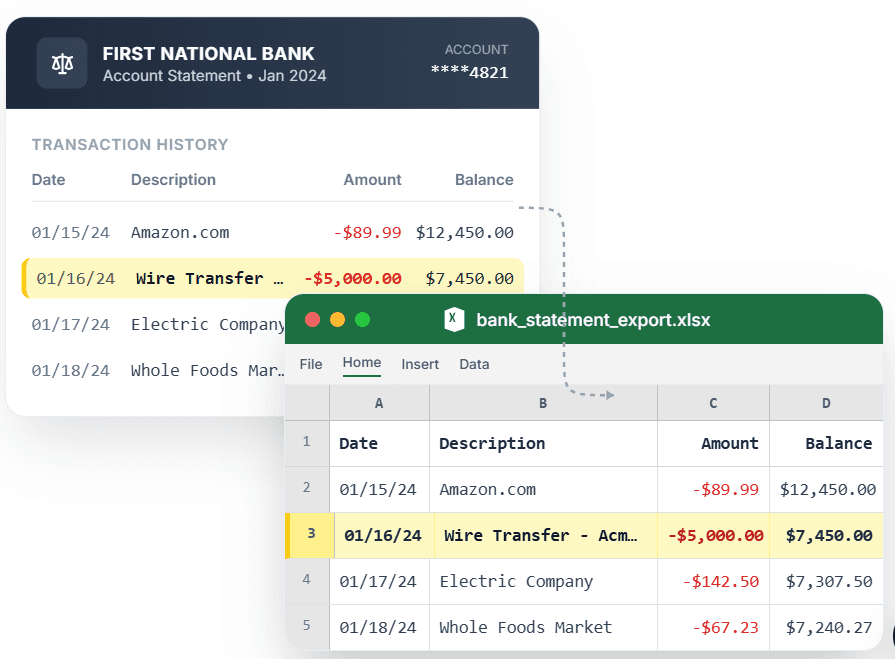
PDF → Clean Excel with separated columns, no merged cells.
Need to convert a bank statement to CSV? Most converters charge per conversion or require subscription. CleanStmt is a free online bank statement to CSV converter that extracts every transaction into clean rows with stable date, description, and amount columns. Upload your PDF, scan, or screenshot, review the extracted data, and download a CSV that opens cleanly in Excel, Google Sheets, or any accounting tool. No signup, no subscription, no per-conversion fees.
What you need
- A bank statement in PDF, scan, or screenshot form
- Any device with a browser
- No account, subscription, or payment required
How it works — three steps, under a minute
- 1Upload your bank statement PDF, scan, or screenshot — all major banks supported.
- 2Review extracted transactions with clean date, description, and amount columns.
- 3Download CSV file ready for Excel, Google Sheets, or accounting imports.
Why use CleanStmt for this
Built so the export is ready the moment you download it.
Completely Free
No per-conversion charges, no subscription fees, no hidden costs — convert unlimited statements.
Clean CSV Output
Every transaction on its own row with consistent columns that import without cleanup.
Works Online
No software to download or install — runs in any browser on desktop, tablet, or phone.
Who uses this workflow
Individuals
Convert personal bank statements to CSV without paying for software.
Freelancers
Track income and expenses in CSV without subscription fees.
Small Businesses
Get statement data into spreadsheets without monthly converter costs.
Students
Analyze transaction data for projects without paying for tools.
CleanStmt vs generic converters
Generic tools export a file. CleanStmt exports a file you can actually use.
| Feature | Other Services | CleanStmt |
|---|---|---|
| Pricing | Subscription or per-conversion fees | Completely free, unlimited conversions |
| Software | Download and install required | Works online in any browser |
| Output quality | Messy CSV with cleanup needed | Clean rows, import-ready |
Frequently asked questions
Is the bank statement to CSV converter really free?
Yes. CleanStmt is completely free with no per-conversion charges, no subscription fees, and no conversion limits.
Do I need to create an account to convert statements?
No. Convert bank statements to CSV without signing up or entering payment information.
Which banks are supported by the converter?
All major banks are supported: Chase, Wells Fargo, Bank of America, Citi, Capital One, and more. The converter works with any statement PDF format.
Can I use the converter on my phone?
Yes. The converter runs in any mobile browser, so you can photograph a statement and convert it to CSV from your phone.
Is my financial data kept private?
Yes. Files process in memory and auto-delete within one hour, with no human review.