Convert Multiple Bank Statements to Excel — Batch Processing
Convert multiple bank statements to one Excel file. Process multiple months and combine transactions into a single spreadsheet — perfect for multi-period reconciliation.
Use the same upload flow to convert files into clean, accounting-ready output with no merged cells.
Apply this workflow in seconds
Upload your file, review the extracted table, and export clean Excel or CSV output for accounting tools.
Drop Image / PDF
Or Ctrl+V paste
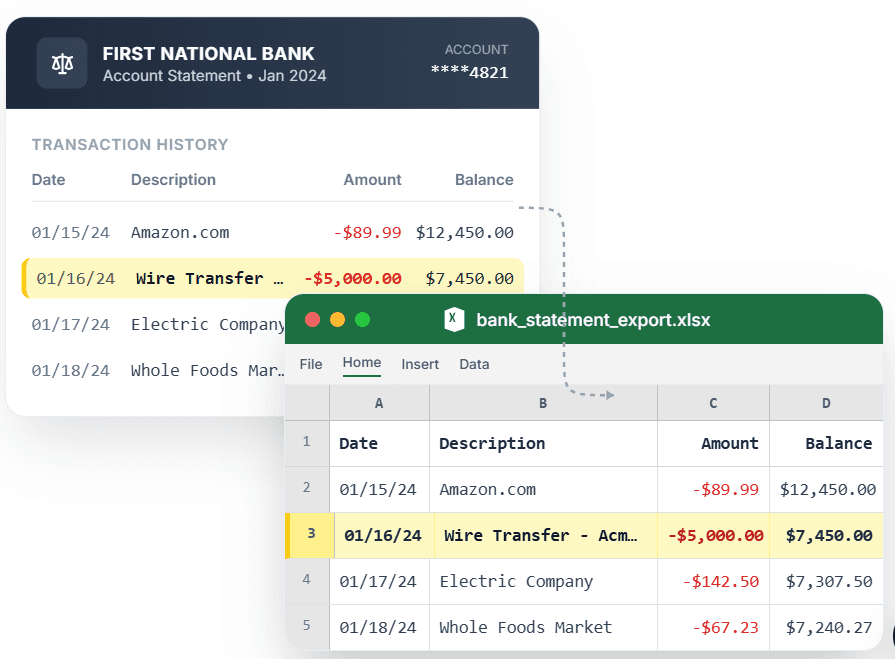
PDF → Clean Excel with separated columns, no merged cells.
Reconciling six months of transactions scattered across six PDF statements means six uploads, six exports, and manual copy-pasting — unless you batch process them. CleanStmt lets you convert multiple bank statements and combine all transactions into a single Excel file with consistent date, description, and amount columns. Upload statements from different months, review all extracted rows together, and download one consolidated .xlsx with every transaction ready for analysis. No merged cells, no manual merging.
What you need
- Multiple bank statements in PDF, scan, or screenshot form
- Any device with a browser
- No account or credit card required
How it works — three steps, under a minute
- 1Upload multiple bank statement PDFs, scans, or screenshots sequentially.
- 2Review all transactions extracted into consistent columns across statements.
- 3Download one Excel file with all periods of transactions in clean rows.
Why use CleanStmt for this
Built so the export is ready the moment you download it.
Consolidated Excel Output
All transactions from multiple statements land in one .xlsx file, eliminating manual copy-paste.
Cross-Period Analysis
Build pivot tables, SUM ranges, and charts across months without restructuring data.
Consistent Column Structure
Date, description, and amount columns stay aligned across statements from different periods.
Who uses this workflow
Bookkeepers
Reconcile quarterly or annual statements without merging files manually.
Small Business Owners
Track cash flow trends across multiple months in one Excel file.
Accountants
Prepare year-end reports from a full year of statement PDFs.
Auditors
Review transaction history across periods in a single spreadsheet.
CleanStmt vs generic converters
Generic tools export a file. CleanStmt exports a file you can actually use.
| Feature | Other Services | CleanStmt |
|---|---|---|
| Multi-file handling | Convert and merge manually | All statements in one Excel file |
| Column alignment | Columns misalign between months | Same structure across all statements |
| Cross-period analysis | Build separate reports per month | One file, unified analysis |
Frequently asked questions
How do I convert multiple bank statements to one Excel file?
Upload each statement to CleanStmt sequentially. All transactions export into one Excel file with consistent date, description, and amount columns across every period.
Can I merge statements from different banks into one file?
Yes. CleanStmt normalizes different bank layouts into the same column structure, so you can combine statements from multiple banks in one Excel file.
Will the data be sorted by date across all statements?
Transactions export in the order they appear in each statement. After downloading, sort the entire Excel file by the Date column for chronological order.
How many statements can I batch convert?
There is no hard limit. Process as many statements as needed — each exports to the same consistent structure for easy combination.
Is my financial data kept private?
Yes. Files process in memory and auto-delete within one hour, with no human review.