Scan Receipts to Excel — Turn Any Receipt into a Spreadsheet
Scan receipts to Excel in seconds. Convert receipt PDFs and photos into clean spreadsheet rows with date, merchant, and amount — no manual entry.
Use the same upload flow to convert files into clean, accounting-ready output with no merged cells.
Apply this workflow in seconds
Upload your file, review the extracted table, and export clean Excel or CSV output for accounting tools.
Drop Image / PDF
Or Ctrl+V paste
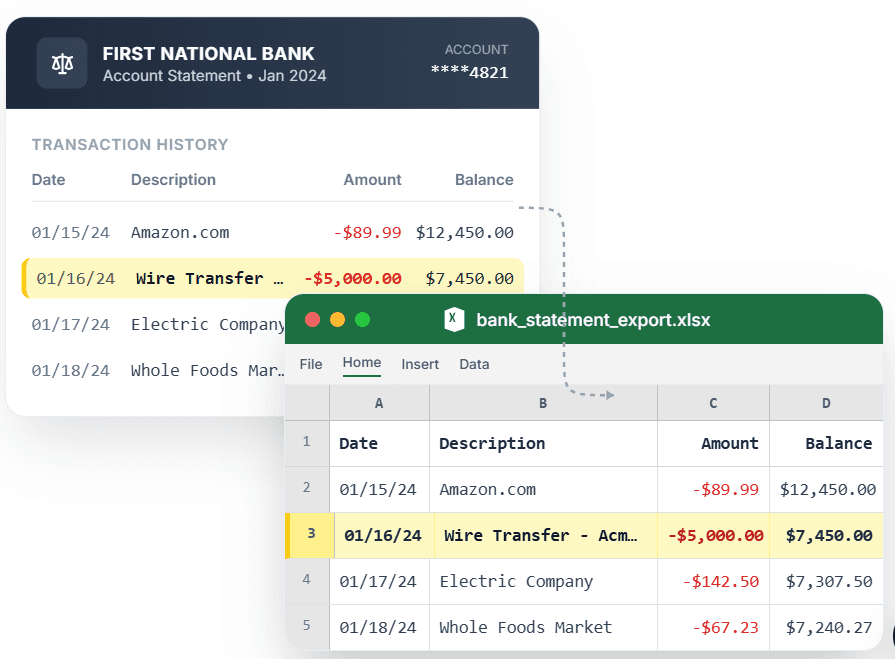
PDF → Clean Excel with separated columns, no merged cells.
If you have ever tried to scan receipts to Excel, you know generic tools just dump unreadable text into a cell. CleanStmt is built to scan receipts into Excel properly: photograph or upload a receipt, and it extracts the merchant, date, and amount into clean spreadsheet rows. Whether you are reconciling expense reports, prepping for tax season, or tracking reimbursements, a receipt scanner to Excel should give you structured columns — not a wall of text. Drop in a receipt, review the extracted fields, and download an Excel or CSV file with every receipt on its own tidy row.
What you need
- A receipt as a photo, scan, or PDF
- Any device with a browser — your phone works great
- No account or credit card required to start
How it works — three steps, under a minute
- 1Upload your receipt — PDF, JPG, or PNG from your phone or scanner.
- 2CleanStmt extracts merchant, date, and amount into clean spreadsheet rows.
- 3Download Excel or CSV for expense reports, bookkeeping, or reimbursements.
Why use CleanStmt for this
Built so the export is ready the moment you download it.
Merchant, Date & Amount Columns
Every receipt becomes a clean row with the fields expense tracking actually needs.
Phone Photos Work
Snap a receipt with your phone and scan it to Excel on the spot — no scanner required.
Expense-Report Ready
Export Excel or CSV formatted for reimbursements, bookkeeping, and tax prep.
Who uses this workflow
Freelancers & Contractors
Log business receipts to Excel for taxes without keying each one.
Business Travelers
Scan hotel and meal receipts to a spreadsheet for fast expense reports.
Small Business Owners
Track expense receipts in Excel without paid expense software.
Bookkeepers
Turn a client's receipt pile into clean spreadsheet rows in minutes.
CleanStmt vs generic converters
Generic tools export a file. CleanStmt exports a file you can actually use.
| Feature | Other Services | CleanStmt |
|---|---|---|
| Output | Raw text pasted into one cell | Merchant, date, amount in clean columns |
| Source | Typed entry from the paper receipt | Phone photo, scan, or PDF |
| Spreadsheet structure | Merged cells and broken rows | One receipt per tidy row |
Frequently asked questions
How do I scan receipts to Excel?
Upload a photo, scan, or PDF of the receipt to CleanStmt. It extracts the merchant, date, and amount into clean spreadsheet rows, then you download an Excel or CSV file — no manual entry.
Can I scan receipts into Excel from my phone?
Yes. CleanStmt runs in any mobile browser, so you can photograph a receipt and convert it to an Excel row directly from your phone.
Does the receipt scanner to Excel capture the merchant and amount separately?
Yes. Merchant, date, and amount each land in their own column, so the spreadsheet is ready for expense tracking and bookkeeping.
Can I scan multiple receipts into one spreadsheet?
Yes. Each receipt becomes its own row, so you can build a single expense spreadsheet from many receipts.
Is my receipt data kept private?
Yes. Files are processed in memory and auto-deleted within one hour, with no human review.
Do I need an account to scan receipts to Excel?
No. You can scan receipts to Excel and download the file without signing up or entering a credit card.