Convert PDF Bank Statement to Excel
Convert PDF bank statements to Excel spreadsheets in seconds. Every transaction extracted into clean rows with stable date, description, and amount columns.
Use the same upload flow to convert files into clean, accounting-ready output with no merged cells.
Apply this workflow in seconds
Upload your file, review the extracted table, and export clean Excel or CSV output for accounting tools.
Drop Image / PDF
Or Ctrl+V paste
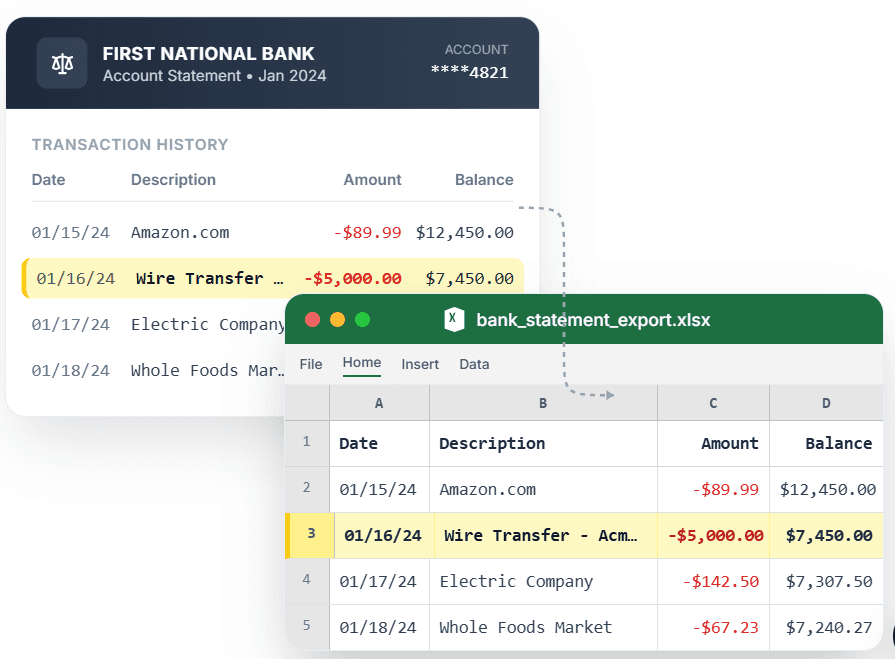
PDF → Clean Excel with separated columns, no merged cells.
A bank statement PDF looks fine on screen and turns into a nightmare the moment you open it in Excel — copy-paste collapses transactions into one cell, and the converters that promise a clean spreadsheet hand you merged cells and broken rows instead. CleanStmt converts your PDF bank statement to Excel the way it should work: every transaction on its own row, with date, description, and amount in stable columns you can sort, filter, and total immediately. Upload a PDF, scan, or screenshot, confirm the extracted rows, and download a ready-to-use .xlsx file with zero merged cells to untangle.
What you need
- A bank statement in PDF, scan, or screenshot form
- Any device with a browser — desktop, tablet, or phone
- No account or credit card required to start
How it works — three steps, under a minute
- 1Upload your PDF bank statement, scan, or screenshot.
- 2CleanStmt extracts every transaction into clean Excel rows with no merged cells.
- 3Download a ready-to-use .xlsx file you can sort, filter, and total.
Why use CleanStmt for this
Built so the export is ready the moment you download it.
Zero Merged Cells
Every transaction lands on its own row, so you can sort and filter without splitting cells first.
Ready-to-Use .xlsx
Download a native Excel file with formatted columns — no copy-paste, no reshaping.
Sortable & Totalable
Stable date and amount columns mean SUM, filters, and pivot tables work right away.
Who uses this workflow
Small Business Owners
Get statement transactions into Excel without retyping every line.
Bookkeepers
Turn client PDF statements into clean spreadsheets in minutes.
Accountants
Move statement data into Excel for analysis and ledger imports.
Financial Analysts
Build pivot tables and totals from statement data without cleanup.
CleanStmt vs generic converters
Generic tools export a file. CleanStmt exports a file you can actually use.
| Feature | Other Services | CleanStmt |
|---|---|---|
| Row structure | Transactions collapse into one cell | One transaction per clean row |
| Cell formatting | Merged cells break sorting | Zero merged cells, fully sortable |
| Output | Copy-paste or broken converters | Native ready-to-use .xlsx |
Frequently asked questions
How do I convert a PDF bank statement to Excel with no merged cells?
Upload the PDF to CleanStmt and it extracts each transaction onto its own row with stable date, description, and amount columns, then exports a native .xlsx file with zero merged cells.
Can I sort and filter the exported Excel file right away?
Yes. Because every transaction is on its own row with consistent columns, sorting, filtering, SUM, and pivot tables all work immediately.
Does it work on scanned or screenshot statements?
Yes. CleanStmt accepts PDFs, scans, and screenshots and produces the same clean Excel output from any of them.
Can I export to CSV instead of Excel?
Yes. You can download the extracted statement as Excel (.xlsx) or CSV, depending on your workflow.
Is my financial data kept private?
Yes. Files are processed in memory and auto-deleted within one hour, with no human review.