Use Case
Convert PDF Statements to Excel for Bank Reconciliation
Prepare reconciliation-ready bank statement data from PDF files with normalized columns and zero merged cells.
Use the same upload flow to convert files into clean, accounting-ready output with no merged cells.
Upload your bank statement PDF or paste a screenshot.
Let CleanStmt extract transactions into clean columns with no merged cells.
Download Excel or CSV and match line items in your reconciliation workflow.
Apply this workflow in seconds
Upload your file, review the extracted table, and export clean Excel or CSV output for accounting tools.
Primary keyword focus: convert pdf to excel for bank reconciliation
Workflow Preview Placeholder
Drop Image / PDF
Or Ctrl+V paste
Paste supported
|Max 10 MBOutput Preview
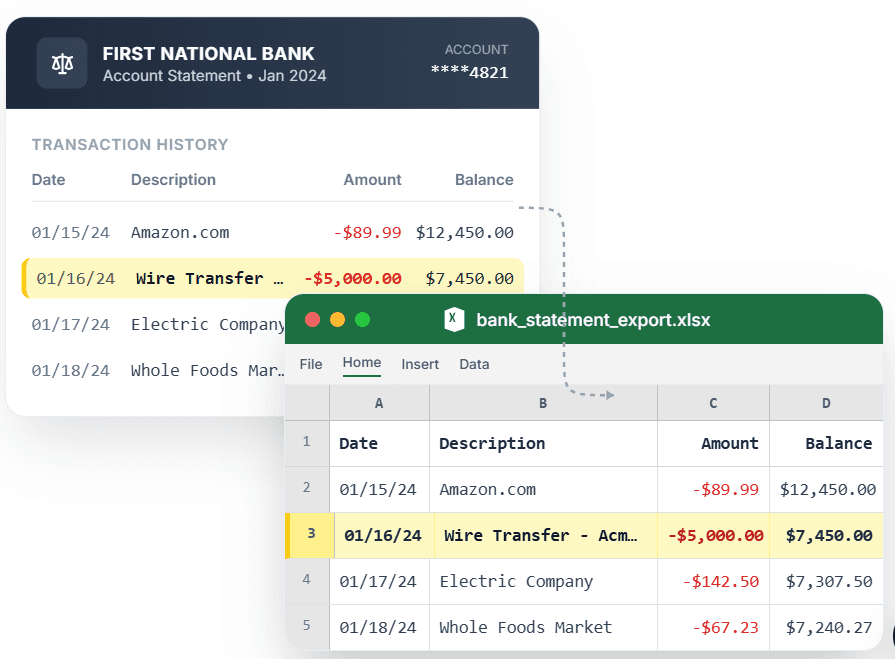
PDF → Clean Excel with separated columns, no merged cells.
Popular bank statement converters
Convert Chase StatementConvert Bank of America StatementConvert Wells Fargo StatementConvert Citibank StatementConvert Capital One StatementConvert U.S. Bank StatementConvert PNC Bank StatementConvert Truist Bank StatementConvert Marcus Statement
View all conversion use cases