Convert Credit Card Statements to Excel
Convert credit card statement PDFs to clean Excel spreadsheets. Extract every transaction with date, merchant, and amount — ready for expense tracking or accounting.
Use the same upload flow to convert files into clean, accounting-ready output with no merged cells.
Apply this workflow in seconds
Upload your file, review the extracted table, and export clean Excel or CSV output for accounting tools.
Drop Image / PDF
Or Ctrl+V paste
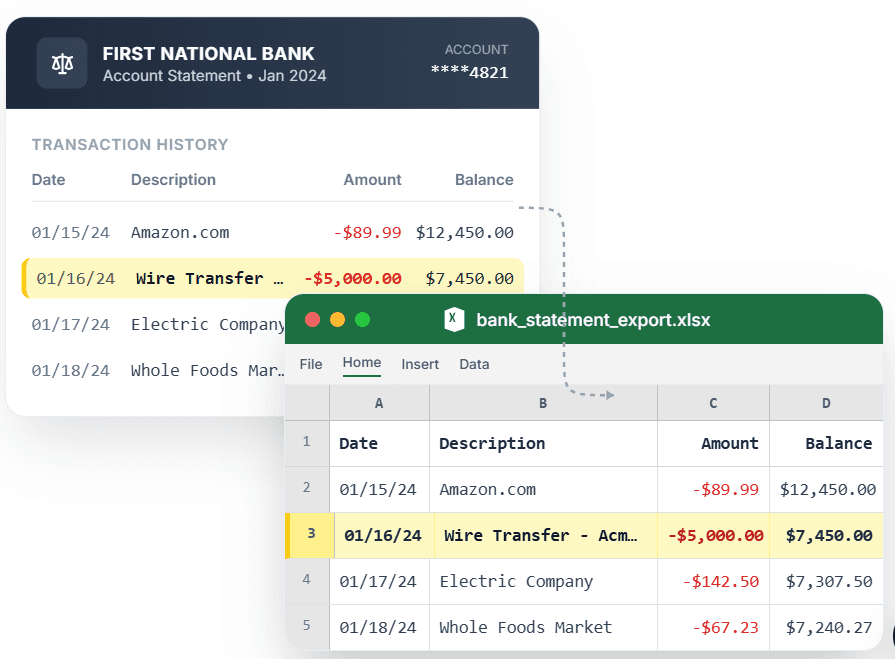
PDF → Clean Excel with separated columns, no merged cells.
Credit card statements bury your transactions inside fee blocks, rewards summaries, and payment sections — so generic converters spit out a tangled mess. CleanStmt isolates the transaction rows and converts your credit card statement PDF to Excel with date, merchant, and amount in clean columns. Whether you are categorizing spend for taxes, building an expense report, or reconciling a card account, you get every transaction on its own row with no merged cells to clean up.
What you need
- A credit card statement in PDF, scan, or screenshot form
- Any device with a browser — desktop, tablet, or phone
- No account or credit card required to start
How it works — three steps, under a minute
- 1Upload your credit card statement PDF from any major issuer.
- 2CleanStmt extracts all transactions into clean debit/credit columns.
- 3Download Excel or CSV for expense tracking, tax prep, or reconciliation.
Why use CleanStmt for this
Built so the export is ready the moment you download it.
Transactions Only
Isolates spending rows from fee blocks, rewards, and payment summaries.
Date, Merchant & Amount
Every charge exports into clean columns ready for categorization.
Any Major Issuer
Handles statement layouts from the major card issuers consistently.
Who uses this workflow
Small Business Owners
Categorize card spend for taxes without manual entry.
Freelancers & Contractors
Separate business charges into a clean expense spreadsheet.
Bookkeepers
Reconcile client card accounts from statement PDFs quickly.
Budget-Conscious Individuals
Track personal spending in Excel without a finance app.
CleanStmt vs generic converters
Generic tools export a file. CleanStmt exports a file you can actually use.
| Feature | Other Services | CleanStmt |
|---|---|---|
| Transaction isolation | Fees and summaries mixed into the data | Clean transaction rows only |
| Columns | Merged cells and drifting amounts | Stable date, merchant, amount |
| Issuer coverage | Breaks on non-standard layouts | Normalizes major issuer formats |
Frequently asked questions
Can I convert a credit card statement PDF to Excel with no merged cells?
Yes. CleanStmt extracts each transaction onto its own row with date, merchant, and amount in stable columns, leaving out fee blocks and summaries.
Does it work with statements from different card issuers?
Yes. CleanStmt normalizes layouts from the major issuers into the same clean Excel structure.
Can I use the export for expense categorization or taxes?
Yes. The clean date, merchant, and amount columns are ready for categorizing spend, building expense reports, or tax prep.
Is my statement data kept private?
Yes. Files are processed in memory and auto-deleted within one hour, with no human review.
Do I need an account to convert a credit card statement?
No. You can convert a credit card statement to Excel without signing up or entering a credit card.