Convert Bank Statement to Excel — Free Instant Conversion
Convert bank statement PDFs to Excel spreadsheets instantly. Free tool extracts transactions into clean rows with date, description, and amount columns.
Use the same upload flow to convert files into clean, accounting-ready output with no merged cells.
Apply this workflow in seconds
Upload your file, review the extracted table, and export clean Excel or CSV output for accounting tools.
Drop Image / PDF
Or Ctrl+V paste
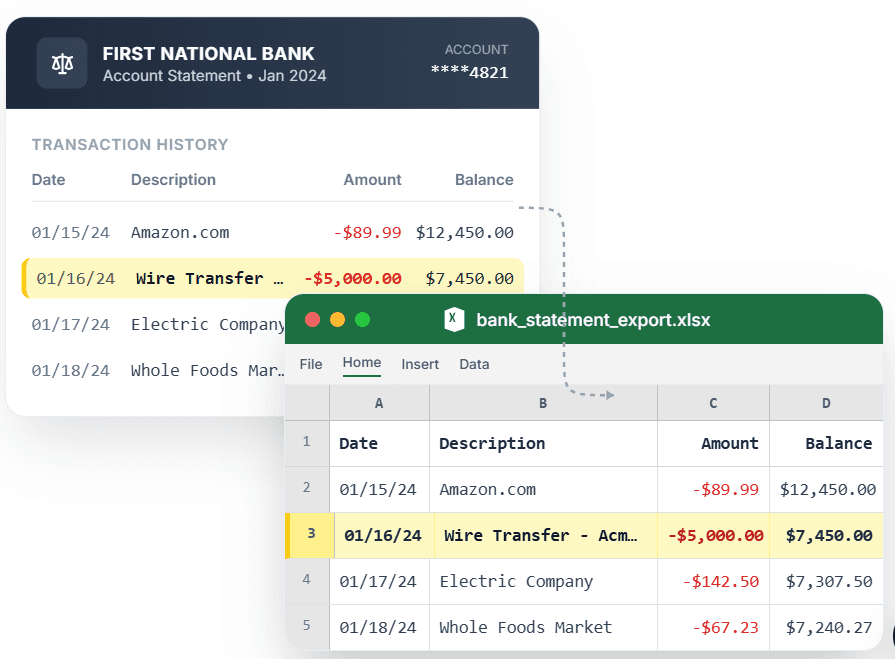
PDF → Clean Excel with separated columns, no merged cells.
Converting a bank statement to Excel should be instant and free — but most tools charge per conversion or produce unusable output. CleanStmt converts your bank statement PDF to Excel in seconds with every transaction on its own clean row. Upload your statement from any bank, review the extracted date, description, and amount columns, and download a ready-to-use .xlsx file. No signup, no payment, no merged cells to fix. The spreadsheet opens in Excel, Google Sheets, or any tool and works with formulas immediately.
What you need
- A bank statement in PDF, scan, or screenshot form
- Any device with a browser
- No account, payment, or software installation required
How it works — three steps, under a minute
- 1Upload your bank statement PDF, scan, or screenshot from any bank.
- 2Preview extracted transactions in clean Excel-ready rows.
- 3Download .xlsx file and open in Excel, Google Sheets, or Numbers.
Why use CleanStmt for this
Built so the export is ready the moment you download it.
Instant Conversion
Upload and convert in seconds — no waiting, no processing delays.
Free with No Limits
Convert unlimited bank statements with no per-conversion charges or subscription fees.
Excel-Ready Output
Download native .xlsx files that open directly in Excel with proper formatting and sortable columns.
Who uses this workflow
Personal Finance Trackers
Get bank transactions into Excel budgets without manual entry.
Small Business Owners
Convert business account statements to Excel for expense tracking.
Bookkeepers
Turn client PDF statements into Excel files in seconds, not hours.
Students & Researchers
Analyze financial data in Excel without paying for conversion tools.
CleanStmt vs generic converters
Generic tools export a file. CleanStmt exports a file you can actually use.
| Feature | Other Services | CleanStmt |
|---|---|---|
| Speed | Slow processing or queues | Instant conversion in seconds |
| Cost | Per-conversion fees or subscriptions | Completely free, unlimited |
| Usability | Requires cleanup before use | Excel-ready, formulas work immediately |
Frequently asked questions
How do I convert a bank statement to Excel for free?
Upload your statement PDF to CleanStmt. It extracts transactions into clean rows with date, description, and amount columns, then exports a free .xlsx file.
Do I need Excel installed to convert statements?
No. The conversion happens online in your browser. The output .xlsx file opens in Excel, Google Sheets, Numbers, or any spreadsheet tool.
Are there any conversion limits?
No. Convert unlimited bank statements with no per-file charges, daily limits, or subscription requirements.
Can I convert statements from any bank?
Yes. The converter works with statement PDFs from all major banks: Chase, Wells Fargo, Bank of America, Citi, Capital One, and more.
Is my financial data kept private?
Yes. Files process in memory and auto-delete within one hour, with no human review.