Bank Statement to Tally Prime — CSV Import Tool
Convert bank statements to Tally Prime format for fast reconciliation. Upload your PDF or scan from any Indian bank, and get a CSV file with Date, Particulars, Debit, Credit columns that imports directly via Gateway → Display → Day Book → Alt+I.
Tally Prime requires specific column structure for bank imports. CleanStmt extracts transactions from HDFC, ICICI, SBI, Axis, or any bank statement and formats them for Tally Prime's Day Book import — no manual entry, no CSV reformatting.
The fastest way to import bank statements into Tally Prime
Upload your statement, download Tally-ready CSV, and import into Day Book in seconds. No manual keying, no column mapping.
Free bank statement to Tally converter — no account or credit card required.
Drop Image / PDF
Or Ctrl+V paste
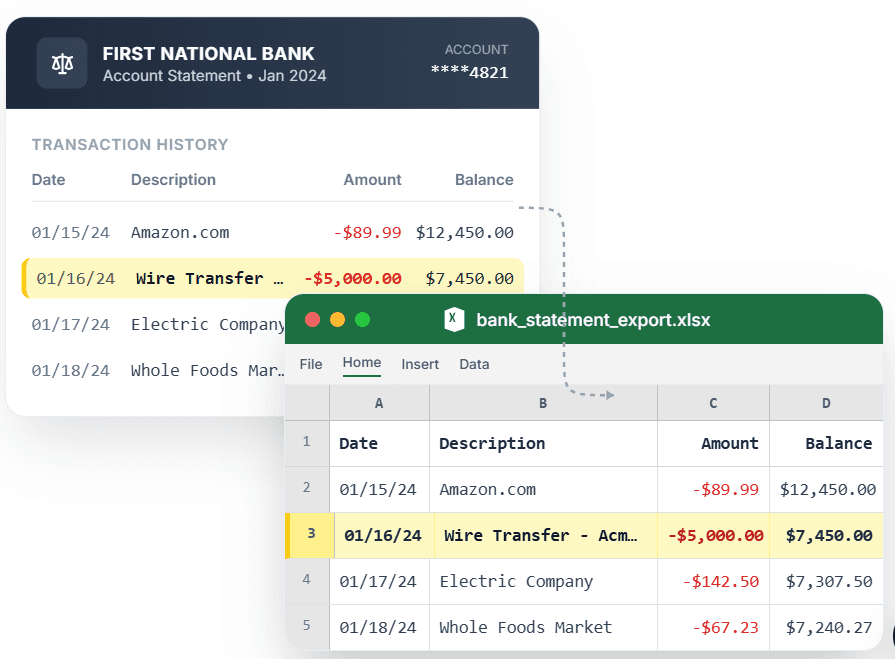
PDF → Clean Excel with separated columns, no merged cells.
Converting bank statements to Tally Prime by hand means hours of manual entry for each month's transactions. Copy-pasting from PDFs scrambles data, and generic converters export CSVs that Tally rejects due to wrong column names or date formats. CleanStmt is a dedicated bank statement to Tally converter: it extracts transactions with AI OCR, formats dates in DD/MM/YYYY (Indian standard), and exports a CSV file with Date, Particulars, Debit, Credit columns that Tally Prime's Day Book import accepts immediately. Whether you're a CA firm processing client statements or a small business owner reconciling bank accounts, you upload the statement PDF, download the CSV, and import via Gateway → Display → Day Book → Alt+I — reconciliation done in under a minute.
What you need
- A bank statement from any Indian or international bank
- Tally Prime installed (or Tally.ERP 9 with Day Book import)
- No account signup or software install
How it works — three steps, under a minute
- 1Upload your bank statement PDF or scan from any Indian bank.
- 2CleanStmt extracts transactions into Tally Prime format (Date, Particulars, Debit, Credit).
- 3Download CSV and import into Tally Prime: Gateway → Display → Day Book → Alt+I.
Why use CleanStmt for this
Built so the export is ready the moment you download it.
Tally Prime-ready column structure
CSV exports with Date, Particulars, Debit, Credit columns in the exact format Tally Prime's Day Book import expects — no manual field mapping or column renaming.
Indian date format (DD/MM/YYYY)
Dates export in DD/MM/YYYY format (15/01/2024) to match Tally Prime's default settings, preventing date parsing errors during import.
All Indian banks supported
Handles statements from HDFC, ICICI, SBI, Axis, Kotak, Yes Bank, Punjab National Bank, and 100+ other Indian banks, plus international formats.
Fast bank reconciliation
Import months of transactions into Tally Prime in seconds via Day Book (Alt+I), eliminating manual voucher entry and reducing reconciliation time from hours to minutes.
Free and private
Convert bank statement to Tally free — no subscription, no per-file charges. Files process in memory and auto-delete within one hour.
Built for CA firms and SMEs
Designed for Chartered Accountants processing client statements and small businesses maintaining Tally books — handles multiple statements per day without limits.
Who converts bank statements to Excel
Chartered Accountants
Import client bank statements into Tally Prime without manual voucher entry, saving hours on each reconciliation.
Small business owners (India)
Keep Tally Prime books updated with bank transactions quickly, without hiring data entry staff.
Bookkeepers
Reconcile multiple bank accounts in Tally Prime without typing each transaction, reducing errors and turnaround time.
Accounting firms
Process client statement PDFs into Tally-ready CSV format at scale, standardizing workflows across team members.
CleanStmt vs generic converters
Generic tools export a file. CleanStmt exports a bank statement to Excel that you can actually use.
| Feature | Other Services | CleanStmt |
|---|---|---|
| Tally import readiness | Manual entry or CSVs with wrong column names | Tally Prime-ready CSV (Date, Particulars, Debit, Credit) |
| Date format | MM/DD/YYYY (breaks Tally import) | DD/MM/YYYY (Indian standard, Tally-compatible) |
| Indian bank support | Limited to US/UK banks | HDFC, ICICI, SBI, Axis, Kotak, Yes Bank, and all Indian banks |
| Column mapping | Requires manual field mapping in Tally | Pre-mapped columns, direct Day Book import (Alt+I) |
| AI OCR for scans | Native PDFs only | Works on scanned or photographed statements |
Frequently asked questions
How do I import a bank statement into Tally Prime?
Convert your statement with CleanStmt, download the CSV, then in Tally Prime go to Gateway of Tally → Display → Day Book → Press Alt+I (Import) → Select the CSV file. Tally will import all transactions into your bank ledger.
Which Indian banks are supported?
CleanStmt works with all major Indian banks: HDFC, ICICI, SBI, Axis, Kotak, Yes Bank, IDBI, Punjab National Bank, Bank of Baroda, Canara Bank, and 100+ others. The CSV format matches Tally Prime's import structure regardless of bank.
Does the CSV include separate Debit and Credit columns?
Yes. Transactions are split into separate Debit and Credit columns with correct signs, matching Tally Prime's bank ledger format. Dates are in DD/MM/YYYY format.
Can I use this for bank reconciliation in Tally Prime?
Yes. The CSV imports directly into Tally Prime Day Book, allowing you to reconcile bank ledger entries against statement transactions. No manual voucher entry required.
Does CleanStmt support Tally XML import?
Currently, CleanStmt exports Tally Prime-ready CSV (Date, Particulars, Debit, Credit format) which imports directly via Day Book (Alt+I). Tally XML export is planned for future release.
Is my financial data kept private?
Yes. Files are processed in memory and auto-deleted within one hour, with no human review or permanent storage.
Convert your bank statement to any format
Pick the export format your bookkeeping tool expects. Every conversion preserves clean columns with no merged cells.