Bank Statement to QIF Converter — For Quicken
Convert a bank statement to QIF for seamless Quicken import. Upload your PDF, scan, or photo, and get a properly formatted QIF file that Quicken reads without errors — no manual transaction entry, no reconciliation headaches.
QIF (Quicken Interchange Format) is the native format for Quicken and other personal finance software. CleanStmt extracts every transaction with AI OCR and exports a clean QIF file that imports into Quicken on the first try, so you skip the manual data entry and go straight to reconciliation.
The fastest way to convert bank statement to QIF
Upload your statement and download a Quicken-ready QIF file in seconds. No manual typing, no import errors, no reconciliation delays.
Convert bank statement to QIF free — no account, no software install, no per-file fee.
Drop Image / PDF
Or Ctrl+V paste
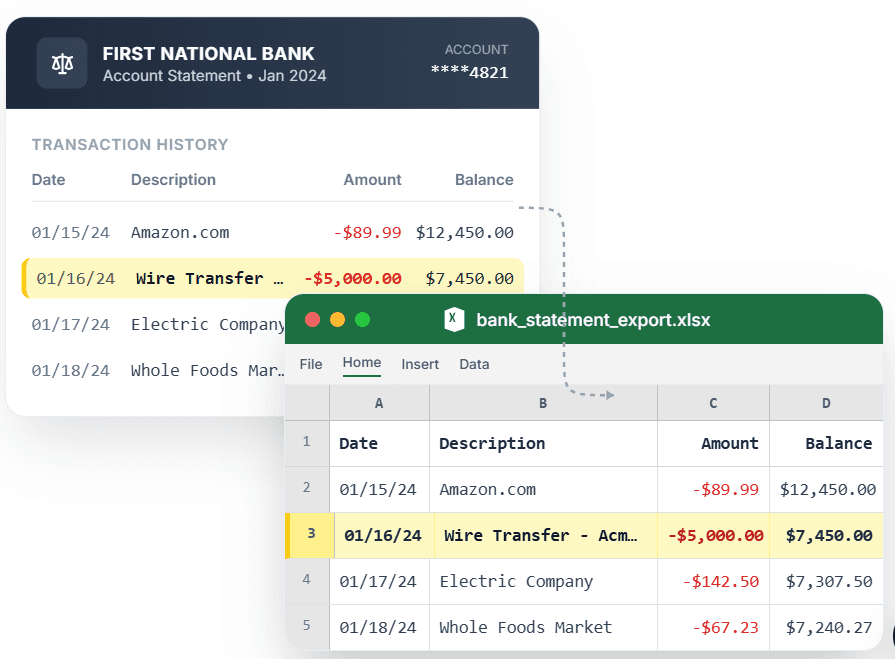
PDF → Clean Excel with separated columns, no merged cells.
Converting a bank statement to QIF by hand means manually typing hundreds of transactions into Quicken or using a generic PDF converter that produces broken QIF files with missing dates, garbled descriptions, and amounts in the wrong fields. When you import that messy QIF, Quicken rejects half the transactions, and you spend an hour fixing the file or re-entering data. CleanStmt is a dedicated bank statement to QIF converter: it reads your statement with AI OCR, recognizes the transaction structure, and exports a properly formatted QIF file that Quicken imports without errors. Whether you need to convert a PDF bank statement to QIF or extract transactions from a scanned image, CleanStmt produces a clean QIF file ready for Quicken reconciliation — no manual fixes, no rejected transactions.
What you need
- A bank statement in any format (PDF, PNG, JPG)
- Quicken or other QIF-compatible software
- No software install or account signup
How it works — three steps, under a minute
- 1Upload your bank statement — PDF, scan, or phone photo.
- 2CleanStmt extracts every transaction with AI OCR.
- 3Download the QIF file and import directly into Quicken.
Why use CleanStmt for this
Built so the export is ready the moment you download it.
Native Quicken QIF format
The exported QIF file follows Quicken's format specification exactly, so transactions import cleanly with correct dates, amounts, payees, and memos — no manual field mapping or error messages.
AI OCR reads scanned statements
Whether your statement is a native PDF or a phone photo, CleanStmt extracts every transaction accurately. Scanned and digital statements produce identical QIF output.
QIF vs QBO: when to use which
QIF works with Quicken desktop and many personal finance apps. QBO is QuickBooks Online only. If you use Quicken or want a universal format, QIF is the right choice. CleanStmt exports both.
Export to multiple formats from one upload
Need more than QIF? From the same extraction, export Excel, CSV, or OFX — no need to re-upload or re-extract if you want to analyze transactions in a spreadsheet first.
Free and fast
Convert bank statement to QIF free, with no account or per-file fee. Most statements extract in under 30 seconds, so you go from upload to Quicken import in under a minute.
Works with any bank
CleanStmt handles statements from Chase, Bank of America, Wells Fargo, credit unions, and 200+ other banks. The AI adapts to each bank's layout automatically.
Who converts bank statements to Excel
Quicken users
Convert monthly bank statements to QIF for seamless Quicken import, eliminating manual transaction entry and reconciliation errors.
Personal finance trackers
Get QIF files for budgeting apps and expense tracking tools without paying for bank feed subscriptions or data aggregation services.
Tax preparers
Extract client bank statements to QIF for income and expense categorization in Quicken or other accounting software during tax season.
Accountants & bookkeepers
Convert client statements to QIF in bulk for Quicken reconciliation without manual data entry or import troubleshooting.
CleanStmt vs generic converters
Generic tools export a file. CleanStmt exports a bank statement to Excel that you can actually use.
| Feature | Other Services | CleanStmt |
|---|---|---|
| QIF format compliance | Broken QIF files with missing dates or amounts in wrong fields | Quicken-spec compliant QIF, imports cleanly without errors |
| Scanned statements | Fail or produce garbled QIF output | AI OCR reads scans and photos as accurately as native PDFs |
| Transaction structure | Payee and memo fields mixed or missing | Proper Date/Payee/Memo/Amount structure in every transaction |
| Other export options | QIF only, or requires separate upload for each format | Also exports Excel, CSV, OFX from same extraction |
| Price | Paywall or per-file fee | Free to convert bank statement to QIF, no signup |
Frequently asked questions
How do I convert a bank statement to QIF?
Upload your statement PDF, scan, or photo to CleanStmt, review the extracted transactions, and click Export to QIF. You get a Quicken-ready QIF file that imports cleanly without errors or manual fixes.
Is the bank statement to QIF converter free?
Yes. CleanStmt converts bank statement to QIF free, with no account, no credit card, and no per-file fee. There's no limit on statement size or transaction count.
What is QIF format, and when do I need it?
QIF (Quicken Interchange Format) is the file format used by Quicken and many personal finance apps. If you use Quicken desktop, Moneydance, or other QIF-compatible software, converting your bank statement to QIF lets you import transactions automatically instead of typing them manually.
Can I convert a scanned PDF bank statement to QIF?
Yes. CleanStmt uses AI OCR, so scanned PDFs and phone photos convert to QIF just as accurately as native digital statements. The QIF file you download imports into Quicken without errors, regardless of whether your original statement was scanned or digital.
What's the difference between QIF and QBO?
QIF is Quicken's format (works with Quicken desktop and many personal finance apps). QBO is QuickBooks Online's format (only works with QuickBooks Online). If you use Quicken, you need QIF. If you use QuickBooks Online, you need QBO. CleanStmt exports both from the same extraction.
Does this work with Quicken for Mac and Windows?
Yes. The QIF format is the same for Quicken on Mac and Windows, so the exported file imports cleanly into both versions. Just download the QIF file and use Quicken's File → Import → QIF menu.